


Recommended


2 Player Games
What is 2 Player Games
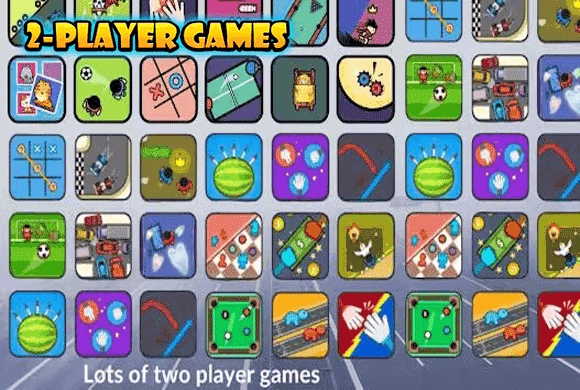
2 Player Games: The Challenge" is the ultimate arcade collection designed for competitive fun on a single device. Whether you are hanging out with a friend or looking to kill time alone, this app offers a diverse variety of 7 exciting mini-games wrapped in a vibrant Red vs. Blue art style. Gone are the days of needing multiple phones; now you can engage in intense 1v1 battles on just one screen! The collection features fan favorites like Foosball, Tank Battle, Car Drift, and Hungry Hippo. Don't have a partner? No problem! The intelligent AI mode allows you to practice your skills and challenge yourself against the computer. With simple one-touch controls and fast-paced gameplay, this collection is perfect for parties, road trips, or quick breaks. Prove who is the superior player in this chaotic and hilarious arena of mini-games!
Key Game Features
Local Multiplayer: Battle friends 1v1 on the same device. Diverse Collection: Includes 7 distinct games like Tanks, Racing, and Sports. AI Opponent Mode: Play against the computer when you are alone. One-Touch Controls: Easy-to-learn mechanics for instant fun. Clean Graphics: Stylish Red vs. Blue cartoon aesthetic.
How to Play & Master
Playing "2 Player Games" is incredibly simple and designed for quick accessibility. First, launch the app and browse the main menu to select one of the 7 mini-games, such as "Car Drift," "Knife Throw," or "Tank Battle." Once a game is selected, choose your mode. If you are with a friend, tap "2 Player." The screen will split into two zones: one for the Red player and one for the Blue player. Place the device on a flat surface like a table between you. If playing alone, select the AI/Bot mode to compete against the computer.
Game Controls
The controls utilize simple touch mechanics. Generally, each player has a dedicated button or screen area (Red or Blue). Tap: Used for shooting (Tanks), eating (Hippos), or throwing (Knives). Hold/Release: Used for steering (Cars) or moving paddles (Foosball).
Frequently Asked Questions (FAQ)
Q: Do I need internet to play? A: No, the core gameplay is offline local multiplayer, perfect for playing anywhere without Wi-Fi. Q: Can I play alone? A: Yes, every mini-game features an AI bot with varying difficulty levels to challenge solo players. Q: How many games are included? A: The app currently features a collection of 7 exciting mini-games including sports, racing, and action genres.
2 Player Games
What is 2 Player Games
2 Player Games: The Challenge" is the ultimate arcade collection designed for competitive fun on a single device. Whether you are hanging out with a friend or looking to kill time alone, this app offers a diverse variety of 7 exciting mini-games wrapped in a vibrant Red vs. Blue art style. Gone are the days of needing multiple phones; now you can engage in intense 1v1 battles on just one screen! The collection features fan favorites like Foosball, Tank Battle, Car Drift, and Hungry Hippo. Don't have a partner? No problem! The intelligent AI mode allows you to practice your skills and challenge yourself against the computer. With simple one-touch controls and fast-paced gameplay, this collection is perfect for parties, road trips, or quick breaks. Prove who is the superior player in this chaotic and hilarious arena of mini-games!
Key Game Features
Local Multiplayer: Battle friends 1v1 on the same device. Diverse Collection: Includes 7 distinct games like Tanks, Racing, and Sports. AI Opponent Mode: Play against the computer when you are alone. One-Touch Controls: Easy-to-learn mechanics for instant fun. Clean Graphics: Stylish Red vs. Blue cartoon aesthetic.
How to Play & Master
Playing "2 Player Games" is incredibly simple and designed for quick accessibility. First, launch the app and browse the main menu to select one of the 7 mini-games, such as "Car Drift," "Knife Throw," or "Tank Battle." Once a game is selected, choose your mode. If you are with a friend, tap "2 Player." The screen will split into two zones: one for the Red player and one for the Blue player. Place the device on a flat surface like a table between you. If playing alone, select the AI/Bot mode to compete against the computer.
Game Controls
The controls utilize simple touch mechanics. Generally, each player has a dedicated button or screen area (Red or Blue). Tap: Used for shooting (Tanks), eating (Hippos), or throwing (Knives). Hold/Release: Used for steering (Cars) or moving paddles (Foosball).
Frequently Asked Questions (FAQ)
Q: Do I need internet to play? A: No, the core gameplay is offline local multiplayer, perfect for playing anywhere without Wi-Fi. Q: Can I play alone? A: Yes, every mini-game features an AI bot with varying difficulty levels to challenge solo players. Q: How many games are included? A: The app currently features a collection of 7 exciting mini-games including sports, racing, and action genres.

Idle Rancher
 608.4K
Chop.io
1.3M
Pop Stone2
4.8M
Mecha Beasts
278.4K
Bubble Legend
1.2M
Crazy Ball
667.7K
Bubble Spinner
1.1M
Tiny Clash
246.5K
Best Link
359.0K
My Fairies Dress Up
137.9K