


Recommended
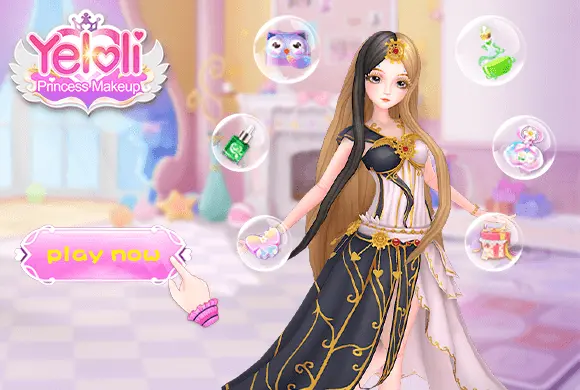



Magic Princess Dress Up
What is Magic Princess Dress Up
Step into a world of sparkles and creativity with Magic Princess Dress Up: Anime Dress Up, the ultimate fashion simulation game for anime lovers! In this vibrant 2D experience, you take on the role of a top-tier stylist tasked with transforming ordinary characters into magical princesses. The game offers a multi-stage makeover process, starting with detailed facial customization—choose from various eye shapes, expressions, and skin tones. Once the base is set, dive into a massive collection of hairstyles, ranging from classic braids to exotic neon colors. The wardrobe is every fashionista's dream, filled with elegant gowns, trendy school uniforms, and mystical accessories like fairy wings and sparkling crowns. With smooth drag-and-drop mechanics, beautiful themed backgrounds, and the ability to save your masterpieces, Magic Princess Dress Up provides a relaxing and highly creative outlet for players of all ages. Can you create the most enchanting anime princess in the galaxy?
Key Game Features
Comprehensive Character Customization: Tweak facial features, eye colors, and expressions to bring your anime princess to life. Vast Fashion Wardrobe: Access thousands of items including dresses, skirts, socks, shoes, and themed accessories. Detailed Makeup Salon: Use professional tools to apply eyeshadow, lipstick, and blush for the perfect glow. Diverse Themed Sets: Explore specialized clothing sets like "Zodiac" and "Magical" to find your unique style. Interactive Photo Mode: Choose from various scenic backgrounds, pose your princess, and take a photo to share with friends.
How to Play & Master
Start by clicking "PLAY" on the main menu. First, enter the makeup stage: use the brush tool to apply foundations and blushes, then select from various eye and lip styles. After completing the face, move to the hair and clothing stage. Browse through categories like hair, tops, skirts, and shoes. Tap on an item to see it applied to your character. You can even customize individual layers like socks and accessories. Don't forget to check the special "Effect" and "Background" tabs to add magical sparkles or scenic locations. When your design is finished, use the camera icon to take a picture. Your creation will be compared with other styles to see its popularity!
Game Controls
Tap/Click: Select items and categories. Drag: Move stickers or accessories on the character.
Frequently Asked Questions (FAQ)
Q: How do I unlock items with the video icon? A: Simply tap on the locked item and choose to watch a short rewarded video to unlock it for your styling session. Q: Can I change the skin color of my character? A: Yes, during the initial customization or within specific menus, you can choose from various skin tones and even colorful options. Q: Is there a way to reset the look? A: You can use the reset button (usually a circular arrow) to clear all current items and start over.
Magic Princess Dress Up
What is Magic Princess Dress Up
Step into a world of sparkles and creativity with Magic Princess Dress Up: Anime Dress Up, the ultimate fashion simulation game for anime lovers! In this vibrant 2D experience, you take on the role of a top-tier stylist tasked with transforming ordinary characters into magical princesses. The game offers a multi-stage makeover process, starting with detailed facial customization—choose from various eye shapes, expressions, and skin tones. Once the base is set, dive into a massive collection of hairstyles, ranging from classic braids to exotic neon colors. The wardrobe is every fashionista's dream, filled with elegant gowns, trendy school uniforms, and mystical accessories like fairy wings and sparkling crowns. With smooth drag-and-drop mechanics, beautiful themed backgrounds, and the ability to save your masterpieces, Magic Princess Dress Up provides a relaxing and highly creative outlet for players of all ages. Can you create the most enchanting anime princess in the galaxy?
Key Game Features
Comprehensive Character Customization: Tweak facial features, eye colors, and expressions to bring your anime princess to life. Vast Fashion Wardrobe: Access thousands of items including dresses, skirts, socks, shoes, and themed accessories. Detailed Makeup Salon: Use professional tools to apply eyeshadow, lipstick, and blush for the perfect glow. Diverse Themed Sets: Explore specialized clothing sets like "Zodiac" and "Magical" to find your unique style. Interactive Photo Mode: Choose from various scenic backgrounds, pose your princess, and take a photo to share with friends.
How to Play & Master
Start by clicking "PLAY" on the main menu. First, enter the makeup stage: use the brush tool to apply foundations and blushes, then select from various eye and lip styles. After completing the face, move to the hair and clothing stage. Browse through categories like hair, tops, skirts, and shoes. Tap on an item to see it applied to your character. You can even customize individual layers like socks and accessories. Don't forget to check the special "Effect" and "Background" tabs to add magical sparkles or scenic locations. When your design is finished, use the camera icon to take a picture. Your creation will be compared with other styles to see its popularity!
Game Controls
Tap/Click: Select items and categories. Drag: Move stickers or accessories on the character.
Frequently Asked Questions (FAQ)
Q: How do I unlock items with the video icon? A: Simply tap on the locked item and choose to watch a short rewarded video to unlock it for your styling session. Q: Can I change the skin color of my character? A: Yes, during the initial customization or within specific menus, you can choose from various skin tones and even colorful options. Q: Is there a way to reset the look? A: You can use the reset button (usually a circular arrow) to clear all current items and start over.

Idle Rancher
 608.4K
Chop.io
1.3M
Pop Stone2
4.8M
Mecha Beasts
278.4K
Bubble Legend
1.2M
Crazy Ball
667.7K
Bubble Spinner
1.1M
Tiny Clash
246.5K
Best Link
359.0K
My Fairies Dress Up
137.9K